
WARP is an outbound transparent SMTP proxy.
It relays SMTP connections between your mail servers and the destination MX without any change to the mail server configuration. Outgoing SMTP connections are redirected to Warp at the network level, Warp records the whole session, hands the message to a filter hook if one is installed, and relays it to the destination MX.
 linyows/warp - GitHub
Why
While outbound email is being delivered normally, little of each session is recorded, which makes it hard to investigate once delivery fails:
- You cannot see what was sent, to whom, or how the destination server replied.
- Throttling and blocklisting are not explicitly reported to the sender — you usually learn about them from your users.
- A single compromised account or misconfigured application can damage the reputation of an entire IP range.
- Auditing outbound mail requires combining external tools with the MTA.
Warp records SMTP sessions on the outbound path and controls whether each message is relayed, without changing the MTA configuration.
Features
Observability
Every SMTP command and reply is captured as it happens, in both directions and on both sides of the proxy. Warp also extracts the metadata of the session — MAIL FROM, RCPT TO, the HELO hostname and the time from connecting to the destination until its 354 reply — and passes it to hooks as structured data. Logs go to stdout by default, and plugins can write them to a file, MySQL, SQLite or Slack.
Filtering
Warp can buffer the entire message during the DATA phase and hand it to a filter hook before relaying it. Warp then acts on the Action of the FilterResult returned by the hook:
| Action | Behaviour |
|---|---|
| Relay | Pass the message to the destination server as-is |
| Reject | Return an SMTP error to the sender; the message never reaches the destination |
| Add header | Modify the message, for example to add an X-Spam-Score header, and then relay it |
Filtering is an extension point rather than something to switch on: none of the built-in plugins implement BeforeRelay, so the decision logic is a plugin you write yourself. Warp uses the first loaded plugin that implements FilterHook.
Deliverability signals
Warp records the time from the moment the connection to the destination is established until the destination replies 354 to the DATA command, which indicates that it is ready to accept the message body. That elapsed time goes into the log and into the connection metadata passed to hooks, together with every SMTP status code of the session. When a filter hook is in use, Warp replies 354 to the client before sending DATA to the destination, so the time is measured up to the client's DATA command instead.
Warp does not evaluate this time itself. A time that keeps growing may indicate that the destination is throttling you, but that judgement is left to whatever consumes the logs.
Outbound address
The source address used for relayed connections is set with -outbound-ip and applies to the whole process. Sending through more than one address means running one instance per address and choosing between them in the iptables rules; Warp does not pick an address per message.
How It Works
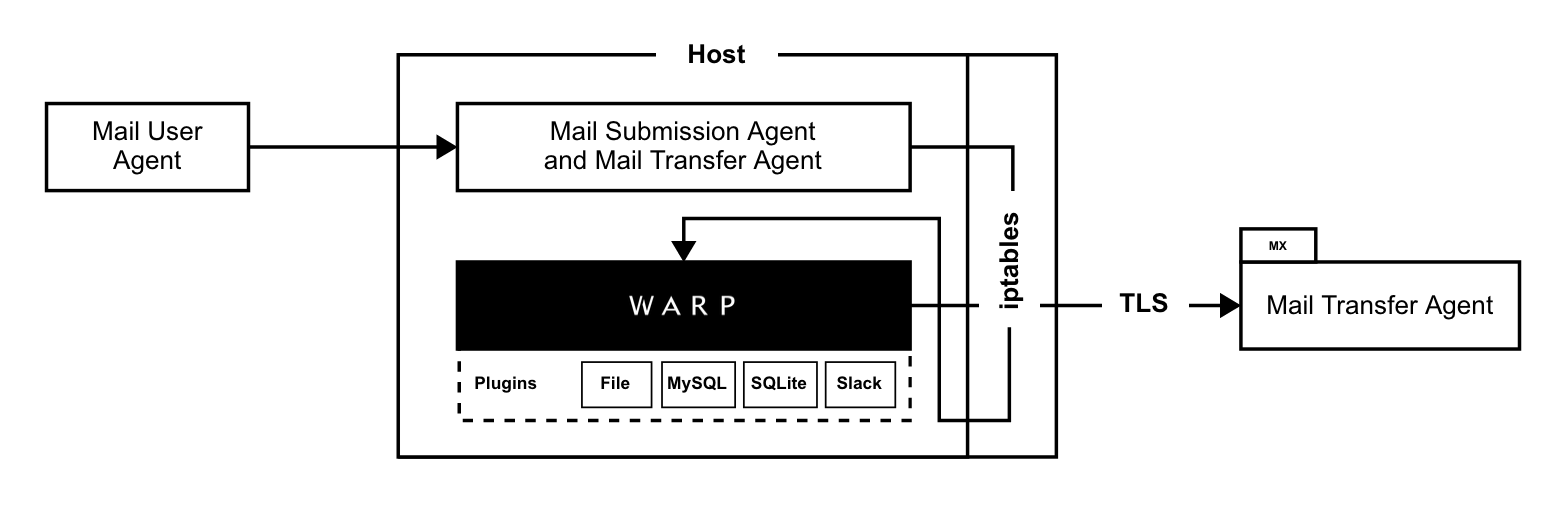
Warp is not an SMTP server that the MTA is configured to relay through; it accepts and relays the connection the MTA opens towards the destination MX. A DNAT rule in the iptables nat table rewrites the destination of outgoing SMTP connections to the address and port of Warp. Warp calls getsockopt with SO_ORIGINAL_DST on the accepted connection to obtain the destination address and port before the rewrite. It then opens its own connection to that destination and relays data in both directions, parsing the SMTP commands and replies as it does so.
The destination returned for SO_ORIGINAL_DST comes from the connection tracking entry created by NAT, and that entry only exists on the host that performed the NAT. Warp therefore has to run on the host where the iptables rule is applied. The MTA itself may run anywhere. This also makes Warp Linux-only in practice, since it relies on Netfilter.
STARTTLS
Warp removes STARTTLS from the EHLO reply of the destination server before returning it to the client. The client therefore does not start TLS, the connection between the client and Warp stays in plain text, and Warp can read the commands and replies. Warp then sends STARTTLS to the destination server itself and establishes the TLS connection.
Only the connection between Warp and the destination server is encrypted. If the MTA and Warp run on separate hosts, SMTP travels in plain text on the network between them. Warp does not verify the certificate of the destination server, and if the destination does not offer STARTTLS, the connection to it is in plain text as well.
Deploy
Same host as the MTA
The connection is created locally, so the rule goes in the OUTPUT chain:
$ iptables -t nat -A OUTPUT -p tcp --dport 25 -j DNAT --to-destination <proxy-ip>:<proxy-port>
This is the layout in the diagram above, where the MTA and Warp share a single host.
Separate hosts
Route the outgoing SMTP traffic of the MTA through the Warp host, for example by making it the default gateway of the network of the MTA, and redirect the traffic in the PREROUTING chain instead:
$ iptables -t nat -A PREROUTING -p tcp --dport 25 -j DNAT --to-destination <proxy-ip>:<proxy-port>
NAT is then performed on the Warp host, so the connection tracking entry is also created there, and Warp can obtain the original destination through SO_ORIGINAL_DST.
Usage
Install the command with Go, or download a pre-built binary from Releases:
$ go install github.com/linyows/warp/cmd/warp@latest
Start the proxy. Without -port it listens on an ephemeral port of 127.0.0.1, which is useful for a first look but not for a real deployment:
$ warp -ip 0.0.0.0 -port 10025 -verbose
2023/11/27 08:16:28.368892 warp listens to 0.0.0.0:10025
| Flag | Default | Description |
|---|---|---|
-ip |
127.0.0.1 |
Listen address |
-port |
ephemeral | Listen port |
-outbound-ip |
0.0.0.0 |
Source address used for relayed connections |
-plugins |
Comma-separated plugin names: mysql, sqlite, file, slack |
|
-message-size-limit |
10240000 |
Maximum size of a message in bytes |
-verbose |
false |
Log every SMTP command and reply |
-pprof |
Expose net/http/pprof on host:port; bind it to a loopback address |
|
-version |
false |
Show the build version |
Plugins
Without plugins, Warp writes logs only to stdout. Plugins store the logs in other destinations, or add the logic that makes the filtering decision. They are Go plugins: .so files loaded at startup from /opt/warp/plugins, or from the directory in PLUGIN_PATH. Only the names listed in -plugins are loaded.
| Plugin | Description | Environment |
|---|---|---|
| file | Appends every SMTP communication to a file as JSON | FILE_PATH |
| mysql | Stores connections and communications in MySQL | DSN |
| sqlite | Stores connections and communications in SQLite | DSN |
| slack | Posts a notification to a channel when a connection closes | SLACK_TOKEN, SLACK_CHANNEL |
Go plugins require cgo, so both Warp and the plugins have to be built with CGO_ENABLED=1:
$ make build-withcgo
$ make mysql-plugin file-plugin
$ export DSN="warp:PASSWORD@tcp(localhost:3306)/warp"
$ export FILE_PATH="/tmp/warp.log"
$ warp -ip 0.0.0.0 -port 10025 -plugins mysql,file
2023/11/27 08:12:04 plugin loaded: /opt/warp/plugins/file.so
2023/11/27 08:12:04 plugin loaded: /opt/warp/plugins/mysql.so
2023/11/27 08:12:04.451675 use file hook
2023/11/27 08:12:04.451677 use mysql hook
2023/11/27 08:12:04.451767 warp listens to 0.0.0.0:10025
The sqlite plugin takes a file path in DSN, such as /var/db/warp.sqlite3.
Database schema
The mysql and sqlite plugins use two tables. connections holds one row per session — id, mail_from, mail_to, elapse in milliseconds and occurred_at — and communications holds one row per SMTP command or reply, referring back to the session through connection_id. The MySQL schema is in misc/setup.sql:
$ mysql < misc/setup.sql
Writing a plugin
A plugin exports a Hook variable implementing the logging interface, and optionally BeforeRelay for filtering:
type Hook interface {
    Name() string
    AfterInit()
    AfterComm(*AfterCommData) // after each SMTP command or reply
    AfterConn(*AfterConnData) // when the connection closes
}

type FilterHook interface {
    Hook
    BeforeRelay(*BeforeRelayData) *FilterResult
}
A plugin has to be built with the same Go toolchain and the same dependency versions as Warp itself; otherwise plugin.Open returns an error and the plugin is not loaded. Build them together.
Logs
Each log line carries the connection id and a two-character marker saying which leg of the session the data belongs to. The markers distinguish data that Warp relayed unchanged from data that Warp rewrote or sent and received itself. In a STARTTLS session, for example, the EHLO reply received from the destination (|<) and the reply returned to the client with STARTTLS removed (<|) are logged on separate lines:
| Marker | Meaning |
|---|---|
-> |
Client to destination |
<- |
Destination to client |
>| |
Client to Warp |
|> |
Warp to destination |
|< |
Destination to Warp |
<| |
Warp to client |
-- |
An event inside Warp |
A session where the destination offers STARTTLS looks like this:
2023/11/27 08:14:54.942921 01HG7XGYYZCEB3WSNXPAVG4ZZN -- connected from 127.0.0.1:49172
2023/11/27 08:14:54.943046 01HG7XGYYZCEB3WSNXPAVG4ZZN -- connecting to 127.0.0.1:11025
2023/11/27 08:14:54.947454 01HG7XGYYZCEB3WSNXPAVG4ZZN <- 220 example.local ESMTP Server\r\n
2023/11/27 08:14:54.947569 01HG7XGYYZCEB3WSNXPAVG4ZZN -> EHLO localhost\r\n
2023/11/27 08:14:54.947752 01HG7XGYYZCEB3WSNXPAVG4ZZN |< 250-example.local\r\n250-STARTTLS\r\n250 8BITMIME\r\n
2023/11/27 08:14:54.951257 01HG7XGYYZCEB3WSNXPAVG4ZZN <| 250-example.local\r\n250 8BITMIME\r\n
2023/11/27 08:14:54.951335 01HG7XGYYZCEB3WSNXPAVG4ZZN -- pipe locked for tls connection
2023/11/27 08:14:54.951341 01HG7XGYYZCEB3WSNXPAVG4ZZN |> STARTTLS\r\n
2023/11/27 08:14:54.957949 01HG7XGYYZCEB3WSNXPAVG4ZZN -- tls connected, to pipe unlocked
2023/11/27 08:14:54.958262 01HG7XGYYZCEB3WSNXPAVG4ZZN <- 250 2.1.0 Ok\r\n
2023/11/27 08:14:54.958316 01HG7XGYYZCEB3WSNXPAVG4ZZN -> RCPT TO:<bob@example.local>\r\n
2023/11/27 08:14:54.958900 01HG7XGYYZCEB3WSNXPAVG4ZZN <- 354 End data with <CR><LF>.<CR><LF>\r\n
2023/11/27 08:14:54.959709 01HG7XGYYZCEB3WSNXPAVG4ZZN -- from:alice@example.test to:bob@example.local elapse:14 msec
2023/11/27 08:14:54.959710 01HG7XGYYZCEB3WSNXPAVG4ZZN -- connections closed
Warp ships with an integration test that starts a sending client and a receiving server, so make integration tests the path from the client through Warp to the receiving server locally.